Quick Overview
| Feature | Details |
|---|---|
| App Name | IceWarp Authenticator |
| Developer | IceWarp |
| Category | Security & Authentication |
| Platform | Android |
| Pricing Model | Free |
| Availability | Google Play Store |
| Best For | IceWarp users who want stronger account security |
| Official Download Source | Google Play Store |
Table of Contents
What Is IceWarp Authenticator and Why Would You Need It?
Passwords are still the most common way people protect online accounts. Unfortunately, passwords alone are often not enough.
A password can be guessed, leaked, reused across multiple websites, or stolen through phishing attacks. When that happens, attackers may gain access to emails, business communication, files, and other sensitive information.
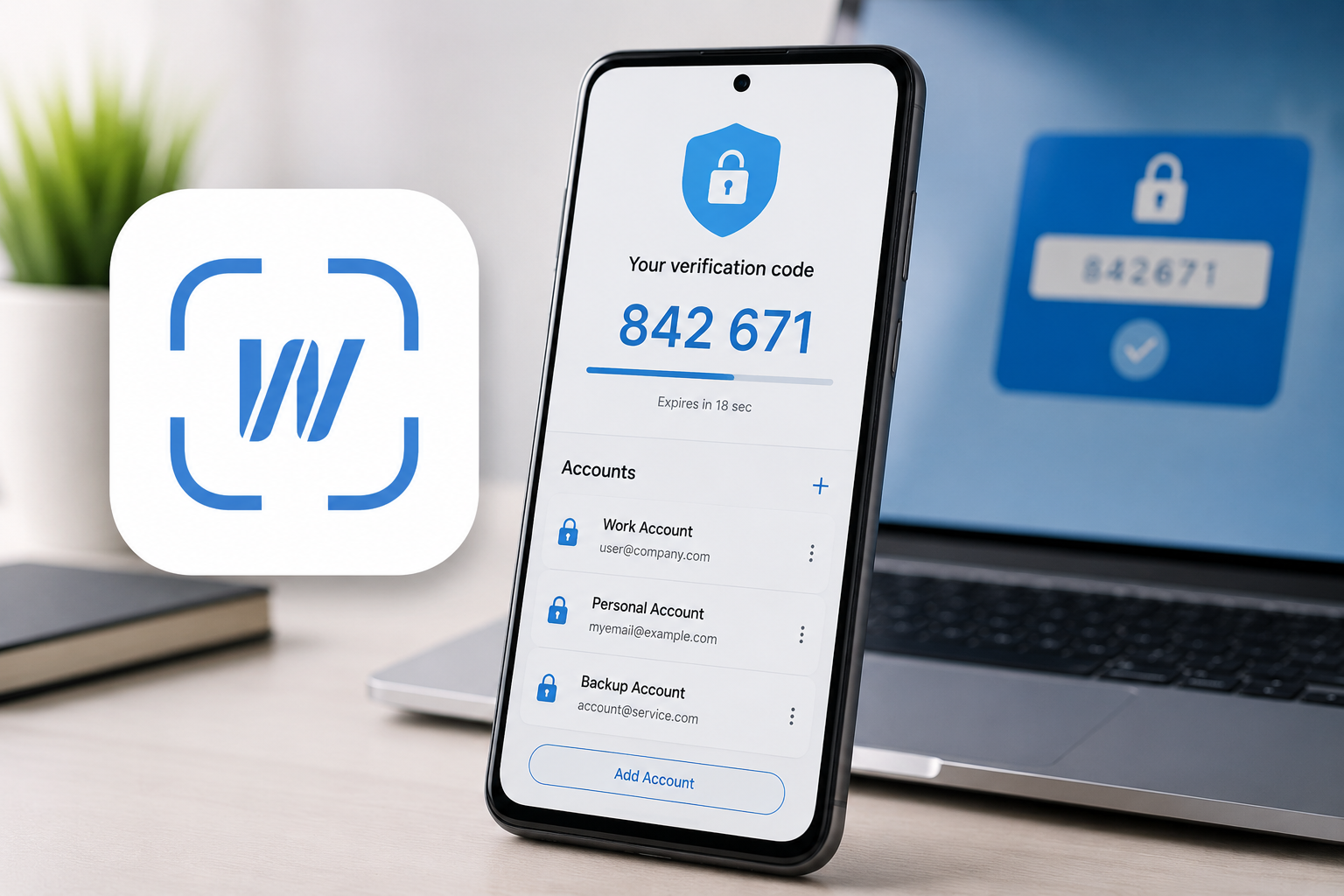
IceWarp Authenticator is designed to add a second layer of protection to IceWarp accounts through two-factor authentication (2FA).
Instead of relying only on a password, users must also enter a temporary verification code generated by the app. These codes change automatically every few seconds and are available directly on the user’s phone.
For organizations already using the IceWarp ecosystem, this creates an additional security checkpoint that makes unauthorized access significantly more difficult.
The key question is not whether two-factor authentication is useful—it absolutely is.
The real question is whether IceWarp Authenticator is the best choice for IceWarp users.
Who Is This App Designed For?
IceWarp Authenticator is not trying to compete with general-purpose authentication apps aimed at everyone.
Its primary audience includes:
- IceWarp email users
- Businesses using IceWarp communication platforms
- IT administrators managing employee accounts
- Remote workers accessing company resources
- Organizations that require stronger login security
If you do not use IceWarp services, this app may have very limited value for you.
Unlike universal authentication apps that support hundreds of services, IceWarp Authenticator is focused specifically on the IceWarp ecosystem.
That specialization can be both a strength and a limitation depending on your needs.
How Does IceWarp Authenticator Actually Work?
The concept is simple.
After enabling two-step verification inside your IceWarp account settings, you connect the account to the app.
The connection typically happens through a QR code.
Once linked, the app generates temporary authentication codes.
When signing in:
- Enter your password.
- Open IceWarp Authenticator.
- Enter the current code.
- Complete login.
Even if someone obtains your password, they would still need physical access to your authentication device.
For business users, this dramatically improves account protection compared to password-only security.
What Makes IceWarp Authenticator Useful?
Dedicated IceWarp Integration
The biggest advantage is seamless compatibility with IceWarp services.
Users do not need complicated configurations or third-party integrations.
The setup process is designed specifically for IceWarp accounts, which reduces confusion for less technical users.
For organizations deploying security measures across multiple employees, simplicity matters.
QR Code Setup Keeps Onboarding Easy
One common complaint with authentication apps is setup complexity.
IceWarp Authenticator addresses this by allowing QR code scanning during account linking.
Most users can complete setup in just a few minutes.
This reduces the risk of configuration errors and helps organizations encourage wider adoption of two-factor authentication.
Multiple Account Support
Many professionals manage more than one IceWarp account.
The ability to store multiple accounts in a single authenticator app can be useful for:
- IT administrators
- Consultants
- Freelancers
- Business owners
Instead of switching between different devices or applications, users can manage several authentication profiles from one location.
Works Without Internet Access
This is one of the most practical benefits.
The verification codes are generated locally on the device.
That means users can still access authentication codes when:
- Traveling internationally
- Experiencing network outages
- Working in low-connectivity environments
- Using devices without active mobile data
For remote workers and frequent travelers, this can be extremely valuable.
What Is the Everyday User Experience Like?
IceWarp Authenticator follows a minimalist approach.
Once setup is complete, most users only interact with the app for a few seconds during login.
The interface appears designed around speed rather than extra features.
For authentication software, that is usually a good thing.
Users generally do not want dozens of settings or unnecessary complexity.
They want:
- Fast code generation
- Reliable performance
- Easy account management
- Simple setup
From a usability perspective, IceWarp Authenticator appears focused on these fundamentals.
Where the App May Feel Limited
No security tool is perfect.
Before installing, users should understand the trade-offs.
Limited Use Outside the IceWarp Ecosystem
If you use Google, Microsoft, Dropbox, GitHub, Amazon, and many other services alongside IceWarp, you may prefer a more universal authenticator.
Many competing apps allow users to manage authentication codes for dozens or even hundreds of services.
IceWarp Authenticator is more specialized.
For some users, that specialization is ideal.
For others, it may mean managing multiple authentication apps.
Fewer Advanced Features
Some modern authenticator apps include:
- Cloud backup
- Device synchronization
- Encrypted recovery options
- Cross-platform account management
Depending on your needs, you may find that dedicated authentication platforms offer more advanced account recovery and migration tools.
Users should evaluate whether simplicity or feature depth is more important for their situation.
Primarily Valuable for Existing IceWarp Users
The app’s usefulness depends heavily on whether you already use IceWarp services.
Someone searching for a general-purpose authenticator may find better alternatives elsewhere.
The strongest value proposition is clearly tied to protecting IceWarp accounts.
Safety and Privacy Considerations
When evaluating security apps, trust is essential.
Several factors are worth considering.
Official Availability
IceWarp Authenticator is available through the official Google Play Store.
Downloading from official distribution channels is generally the safest approach because it reduces the risk of modified or tampered versions.
Permission Requirements
The app may request camera access during setup for QR code scanning.
This is a common and legitimate requirement for authenticator applications.
Users should always review permissions during installation and ensure they understand why each permission is requested.
Account Security Benefits
Two-factor authentication provides meaningful protection against:
- Password leaks
- Credential stuffing attacks
- Basic phishing attempts
- Unauthorized account access
However, users should remember that no authentication system guarantees complete security.
Good password practices remain important.
Who Should Use IceWarp Authenticator?
Recommended For
✅ IceWarp business users
✅ Employees using IceWarp email services
✅ Organizations implementing two-factor authentication
✅ IT teams managing secure account access
✅ Users wanting a dedicated IceWarp authentication solution
These users are likely to receive the most value from the app.
Who Should Skip This App?
Not Ideal For
❌ Users who do not use IceWarp services
❌ People wanting one authenticator for dozens of platforms
❌ Users prioritizing cloud synchronization features
❌ Those looking for advanced password-management integrations
❌ Users seeking broader authentication ecosystems
If your needs extend beyond IceWarp, a more universal authenticator may be a better fit.
Alternatives Worth Considering
1. Google Authenticator
Strengths
- Simple and widely supported
- Trusted by many services
- Easy setup
Weaknesses
- Fewer advanced management features compared to some competitors
Best For
Users wanting a straightforward authenticator for multiple services.
2. Microsoft Authenticator
Strengths
- Strong Microsoft ecosystem integration
- Backup and recovery options
- Broad compatibility
Weaknesses
- Feature set may feel excessive for users wanting simplicity
Best For
Microsoft-centric users and business environments.
3. Authy
Strengths
- Multi-device support
- Cloud backup
- Easy migration
Weaknesses
- Some users prefer completely local authentication storage
Best For
Users managing many accounts across multiple devices.
4. Aegis Authenticator
Strengths
- Open-source approach
- Local encrypted backups
- Strong customization options
Weaknesses
- Slightly steeper learning curve
Best For
Privacy-focused Android users.
Is IceWarp Authenticator Worth Using?
If your organization already relies on IceWarp services, the answer is generally yes.
The app focuses on a single objective: protecting IceWarp accounts with two-factor authentication.
It avoids unnecessary complexity, supports multiple accounts, works offline, and integrates directly with the IceWarp ecosystem.
Its biggest limitation is that it is not designed to be a universal authentication hub.
Users managing many different online services may prefer a broader authenticator platform.
For dedicated IceWarp users, however, the focused approach can actually be an advantage.
Final Verdict
IceWarp Authenticator succeeds at what it was built to do.
It provides an additional security layer for IceWarp accounts without introducing significant complexity. The QR-based setup process is approachable, code generation works offline, and the overall experience appears designed around reliability rather than feature overload.
Main Strengths
- Strong IceWarp integration
- Easy setup process
- Offline code generation
- Multiple account support
- Free to use
Main Weaknesses
- Limited usefulness outside IceWarp
- Fewer advanced recovery features than some competitors
- Not intended as a universal authenticator platform
Best For
Businesses, employees, administrators, and individuals already using IceWarp services who want better account protection.
For that audience, IceWarp Authenticator is a practical and worthwhile security tool.
Frequently Asked Questions
Does IceWarp Authenticator require an internet connection?
No. Authentication codes are generated locally on the device and can typically be accessed without an active internet connection.
Can I use IceWarp Authenticator for non-IceWarp accounts?
The app is primarily designed for IceWarp services. Users needing broader compatibility may prefer universal authenticator apps.
Is IceWarp Authenticator free?
At the time of writing, the app is available as a free download through the Google Play Store.
Why should I enable two-factor authentication?
Two-factor authentication adds an extra security layer that helps protect accounts even if a password becomes compromised.
Can I manage multiple accounts in the app?
Yes. The app supports multiple account configurations, which can be useful for professionals and administrators.
Is IceWarp Authenticator suitable for businesses?
Yes. Organizations using IceWarp communication and email services can benefit from the additional login security provided by two-factor authentication.
What happens if I lose my phone?
Recovery options depend on your organization’s policies and IceWarp account configuration. Users should review recovery procedures before enabling two-factor authentication.
Editorial Disclosure
TNAPK independently reviews apps for informational purposes. Reviews are based on publicly available information, feature analysis, usability observations, and overall user value. App details may change over time. Always verify information through official sources before making decisions.
Keep Exploring
Discover more reviews, guides, and comparisons to help you choose the right Android apps.
 What Is an International Calling App?
Published: 26 Oct 2026 • 01:28 AM Updated: 26 Oct 2026 • 01:28 AM Reading: 8 min read...
What Is an International Calling App?
Published: 26 Oct 2026 • 01:28 AM Updated: 26 Oct 2026 • 01:28 AM Reading: 8 min read...
 Fingerprint Live: What to Know Before Installing
Published: 23 Oct 2026 • 12:54 PM Updated: 23 Oct 2026 • 12:54 PM Reading: 9 min read...
Fingerprint Live: What to Know Before Installing
Published: 23 Oct 2026 • 12:54 PM Updated: 23 Oct 2026 • 12:54 PM Reading: 9 min read...
 What Is a Mobile Vault? Calendar Vault Features and Privacy Explained
Published: 22 Oct 2026 • 01:19 AM Updated: 22 Oct 2026 • 01:19 AM Reading: 7 min read...
What Is a Mobile Vault? Calendar Vault Features and Privacy Explained
Published: 22 Oct 2026 • 01:19 AM Updated: 22 Oct 2026 • 01:19 AM Reading: 7 min read...
 CRED App Review (2026): Is It the Best Credit Card Payment App?
Published: 10 Jul 2026 • 12:34 AM Updated: 10 Jul 2026 • 12:34 AM Reading: 9 min read...
CRED App Review (2026): Is It the Best Credit Card Payment App?
Published: 10 Jul 2026 • 12:34 AM Updated: 10 Jul 2026 • 12:34 AM Reading: 9 min read...