Communication is something most people take for granted until a situation makes speaking difficult or impossible. Whether someone is experiencing an autistic meltdown, temporary speech loss, a medical condition, severe anxiety, or another communication challenge, finding a quick way to communicate can become extremely important.
Emergency Chat is a lightweight communication app designed to address exactly this problem. Instead of relying on voice conversations, the app provides a simple text-based communication environment that allows users to communicate with others when speaking is not possible.
Unlike many communication apps that focus on messaging, social networking, or complex accessibility systems, Emergency Chat takes a minimalistic approach. Its primary goal is to help users explain their situation and communicate effectively during difficult moments.
In this review, we examine what Emergency Chat does, its strengths and limitations, who may benefit from it, and whether it is worth considering as part of an accessibility toolkit.
Table of Contents
Quick App Overview
| Feature | Details |
|---|---|
| App Name | Emergency Chat |
| Developer | Leonard Elezi |
| Category | Utilities |
| Platform | iPhone, iPad |
| Pricing Model | Free |
| Availability | Apple App Store |
| Best For | Non-verbal communication and accessibility support |
| Official Download Source | Apple App Store |
What Is Emergency Chat?
Emergency Chat is a communication assistance application designed for situations where verbal communication becomes difficult or impossible.
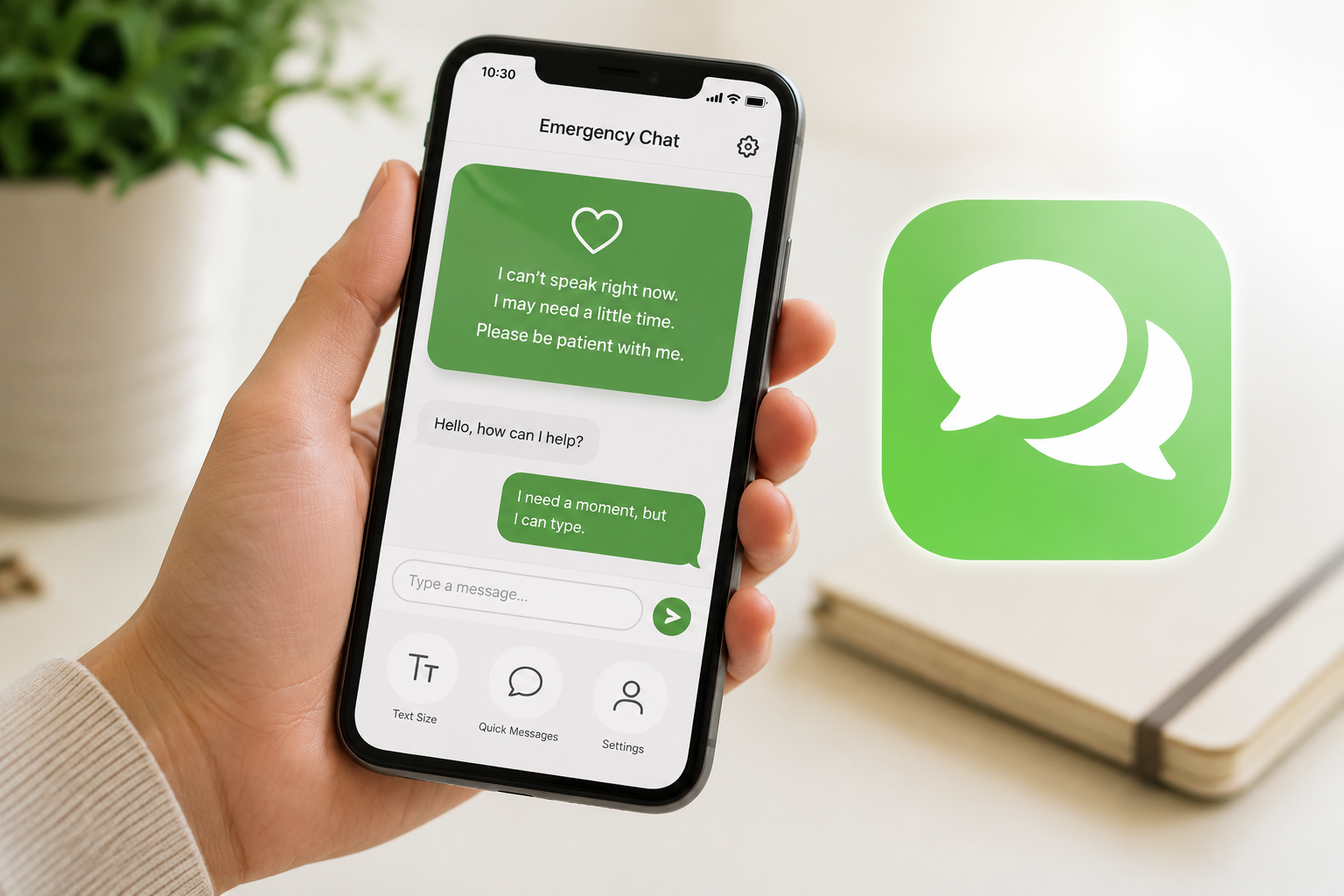
The app presents an introductory message explaining the user’s condition or communication needs. After that, it opens a simple chat interface where communication can continue through typed messages.
The app appears particularly useful for:
- Individuals experiencing autistic meltdowns
- People with speech difficulties
- Users dealing with anxiety-related communication challenges
- Individuals recovering from medical events affecting speech
- Situations where temporary non-verbal communication is necessary
One of the most notable aspects of Emergency Chat is its simplicity. Instead of overwhelming users with features, it focuses on helping users communicate quickly and clearly when they need it most.
Key Features of Emergency Chat
1. Customizable Introduction Screen
One of the app’s most practical features is its customizable welcome message.
When someone receives the user’s phone, they immediately see an explanation of the situation. This can help reduce confusion and create a more supportive interaction.
Why It Matters
In stressful situations, repeatedly explaining a condition may be difficult or impossible.
A pre-written explanation can:
- Reduce misunderstandings
- Improve cooperation
- Save time
- Lower communication stress
Who Benefits
- Autistic individuals
- People with selective mutism
- Users experiencing temporary speech difficulties
2. Simple Text-Based Communication
After the introduction screen, the app transitions into a basic chat interface.
The design focuses on communication rather than distractions.
Benefits
- Easy to understand
- Minimal learning curve
- Fast interaction
- Accessible during stressful situations
Real-World Use Case
Someone experiencing an autistic shutdown may hand their phone to a teacher, caregiver, healthcare professional, or friend. The introductory message explains the situation, and communication can continue through text.
3. Adjustable Font Sizes
Emergency Chat includes font size customization options.
Users can choose text sizes that match their comfort level and visibility needs.
Why This Helps
Accessibility is not one-size-fits-all.
Larger text can help:
- Users with visual impairments
- Older adults
- People under stress who need easier readability
4. Auto-Switch Functionality
The app includes an auto-switch feature that simplifies communication flow.
While relatively simple, this option helps streamline interactions and reduces the number of manual actions required.
Best For
- Faster communication
- Reduced cognitive load
- Improved accessibility
5. Lightweight Design
The application has a very small installation footprint compared with many modern apps.
Advantages
- Quick installation
- Minimal storage usage
- Faster loading times
- Suitable for older devices
Feature Summary
| Feature | Benefit |
|---|---|
| Welcome Message | Explains communication needs instantly |
| Text Chat | Enables communication without speaking |
| Font Size Controls | Improves accessibility |
| Auto-Switch | Simplifies interactions |
| Lightweight Design | Works efficiently on devices |
How to Use Emergency Chat
Using Emergency Chat is straightforward.
Step 1 – Install the App
Download Emergency Chat from the official Apple App Store.
Step 2 – Open Settings
Access the settings menu to customize the welcome message.
Step 3 – Customize Your Message
Create a message explaining your communication needs.
For example:
- Autism-related communication challenges
- Temporary speech loss
- Medical communication requirements
Step 4 – Adjust Accessibility Settings
Choose your preferred font size and other available options.
Step 5 – Use During Communication Situations
When communication becomes difficult, hand the device to another person and allow them to read the introductory message before continuing through text chat.
Performance and User Experience
Emergency Chat focuses on reliability and simplicity rather than advanced features.
Speed
The lightweight nature of the app allows it to launch quickly and respond smoothly.
Ease of Use
The interface is easy to understand, even for first-time users.
Stability
Based on user feedback available through the App Store, many users report positive experiences with the app’s core functionality.
Learning Curve
Very low.
Most users can begin using the app within minutes.
Device Compatibility
The app is designed for Apple devices and appears optimized for iPhone and iPad use.
Performance Summary
| Area | Assessment |
|---|---|
| Speed | Good |
| Ease of Use | Excellent |
| Accessibility | Strong |
| Learning Curve | Very Low |
| Resource Usage | Low |
| Complexity | Minimal |
Pros
| Advantages |
|---|
| Simple and easy-to-use interface |
| Helpful during communication challenges |
| Customizable introduction message |
| Accessibility-focused design |
| Lightweight application |
| Free to download |
| Minimal setup required |
| Suitable for emergency communication scenarios |
Cons
| Limitations |
|---|
| Available primarily on Apple platforms |
| Limited advanced communication tools |
| No multimedia communication options |
| Basic interface may feel too simple for some users |
| Not a replacement for professional accessibility devices |
Is Emergency Chat Safe to Use?
Emergency Chat is distributed through the official Apple App Store, which provides a level of platform review and security oversight.
However, users should always:
- Review the latest privacy information on the App Store listing
- Check permissions before installation
- Read the developer’s privacy practices
- Keep the app updated when updates become available
Based on publicly available information, Emergency Chat appears to be designed primarily as a communication utility rather than a data-heavy service.
As with any app, users should review official privacy details before making decisions.
Who Should Use This App?
| User Type | Suitability |
|---|---|
| Autistic Individuals | Highly Suitable |
| People with Speech Difficulties | Highly Suitable |
| Caregivers | Useful |
| Healthcare Settings | Useful |
| Students | Helpful in specific situations |
| Older Adults | Helpful when speech challenges occur |
| Casual Users | Limited Need |
| Business Users | Generally Not Intended |
App Store Information
| Information | Details |
|---|---|
| Official Store Link | https://apps.apple.com/us/app/emergency-chat/id1024194363 |
| Developer Name | Leonard Elezi |
| Category | Utilities |
| Pricing Model | Free |
| Availability | Apple App Store |
Note: App ratings, downloads, pricing, and availability may change over time. Refer to the official app listing for the latest information.
Screenshots
The app interface includes:
- Welcome Message Screen
- Settings Screen
- Font Size Configuration
- Text Communication Interface
- Accessibility-Oriented Layout
Note: Screenshots are optional. App interfaces, features, and layouts may change over time. Readers should refer to the latest version available on the official app listing.
Alternatives to Emergency Chat
| App | Best For | Key Strength | Major Difference |
|---|---|---|---|
| Speech Assistant AAC | Speech impairments | Advanced communication tools | More feature-rich |
| LetMeTalk AAC | AAC communication | Symbol-based communication | Visual communication support |
| Cboard AAC | Accessibility communication | Cross-platform support | More comprehensive AAC features |
| Proloquo4Text | Text-based AAC | Professional communication tools | Paid accessibility solution |
| Avaz AAC | Autism communication | Educational and AAC features | More structured communication system |
Which Alternative Is Best?
- Emergency Chat → Best for simplicity.
- Speech Assistant AAC → Better for frequent communication needs.
- Proloquo4Text → Better for advanced AAC users.
- Avaz AAC → Strong option for autism support environments.
Final Lines
Emergency Chat serves a very specific purpose, and it does that job well.
Rather than attempting to become a full-featured messaging platform or advanced AAC solution, it focuses on helping users communicate during situations where speech is difficult or unavailable.
Its greatest strengths are simplicity, accessibility, and ease of use. The customizable introductory message is particularly valuable because it helps explain the user’s situation before communication begins.
The app’s limitations largely stem from its minimalist design. Users needing advanced AAC features, visual communication systems, or professional accessibility tools may find more comprehensive alternatives better suited to their needs.
For users seeking a lightweight, easy-to-understand communication assistance app, Emergency Chat is worth considering as part of their accessibility toolkit.
Frequently Asked Questions
Q1. Is Emergency Chat free?
Yes. Emergency Chat is available as a free application through the Apple App Store.
Q2. Is Emergency Chat available on Android?
Based on the information reviewed, the app is primarily listed for Apple devices. Check official stores for current availability.
Q3. Does Emergency Chat require an account?
The app focuses on communication functionality and appears to require minimal setup.
Q4. Is Emergency Chat safe to use?
Users should review official privacy information and permissions before installation, as with any app.
Q5. Who should use Emergency Chat?
The app is most useful for people who may temporarily or regularly experience difficulty speaking.
Q6. Can Emergency Chat replace AAC devices?
No. It may assist communication, but it should not be considered a replacement for professional AAC solutions when those are required.
Q7. What are the best alternatives to Emergency Chat?
Popular alternatives include Speech Assistant AAC, Proloquo4Text, Avaz AAC, LetMeTalk AAC, and Cboard AAC.
Q8. Does Emergency Chat work offline?
Users should check the latest official app information for current functionality and connectivity requirements.
Editorial Disclosure
TNAPK independently reviews apps for informational purposes. Reviews are based on publicly available information, app features, usability observations, and overall user value. App details may change over time. Always verify information through official sources before making decisions.
Keep Exploring
Discover more reviews, guides, and comparisons to help you choose the right Android apps.
 What Is an International Calling App?
Published: 26 Oct 2026 • 01:28 AM Updated: 26 Oct 2026 • 01:28 AM Reading: 8 min read...
What Is an International Calling App?
Published: 26 Oct 2026 • 01:28 AM Updated: 26 Oct 2026 • 01:28 AM Reading: 8 min read...
 Fingerprint Live: What to Know Before Installing
Published: 23 Oct 2026 • 12:54 PM Updated: 23 Oct 2026 • 12:54 PM Reading: 9 min read...
Fingerprint Live: What to Know Before Installing
Published: 23 Oct 2026 • 12:54 PM Updated: 23 Oct 2026 • 12:54 PM Reading: 9 min read...
 What Is a Mobile Vault? Calendar Vault Features and Privacy Explained
Published: 22 Oct 2026 • 01:19 AM Updated: 22 Oct 2026 • 01:19 AM Reading: 7 min read...
What Is a Mobile Vault? Calendar Vault Features and Privacy Explained
Published: 22 Oct 2026 • 01:19 AM Updated: 22 Oct 2026 • 01:19 AM Reading: 7 min read...
 CRED App Review (2026): Is It the Best Credit Card Payment App?
Published: 10 Jul 2026 • 12:34 AM Updated: 10 Jul 2026 • 12:34 AM Reading: 9 min read...
CRED App Review (2026): Is It the Best Credit Card Payment App?
Published: 10 Jul 2026 • 12:34 AM Updated: 10 Jul 2026 • 12:34 AM Reading: 9 min read...