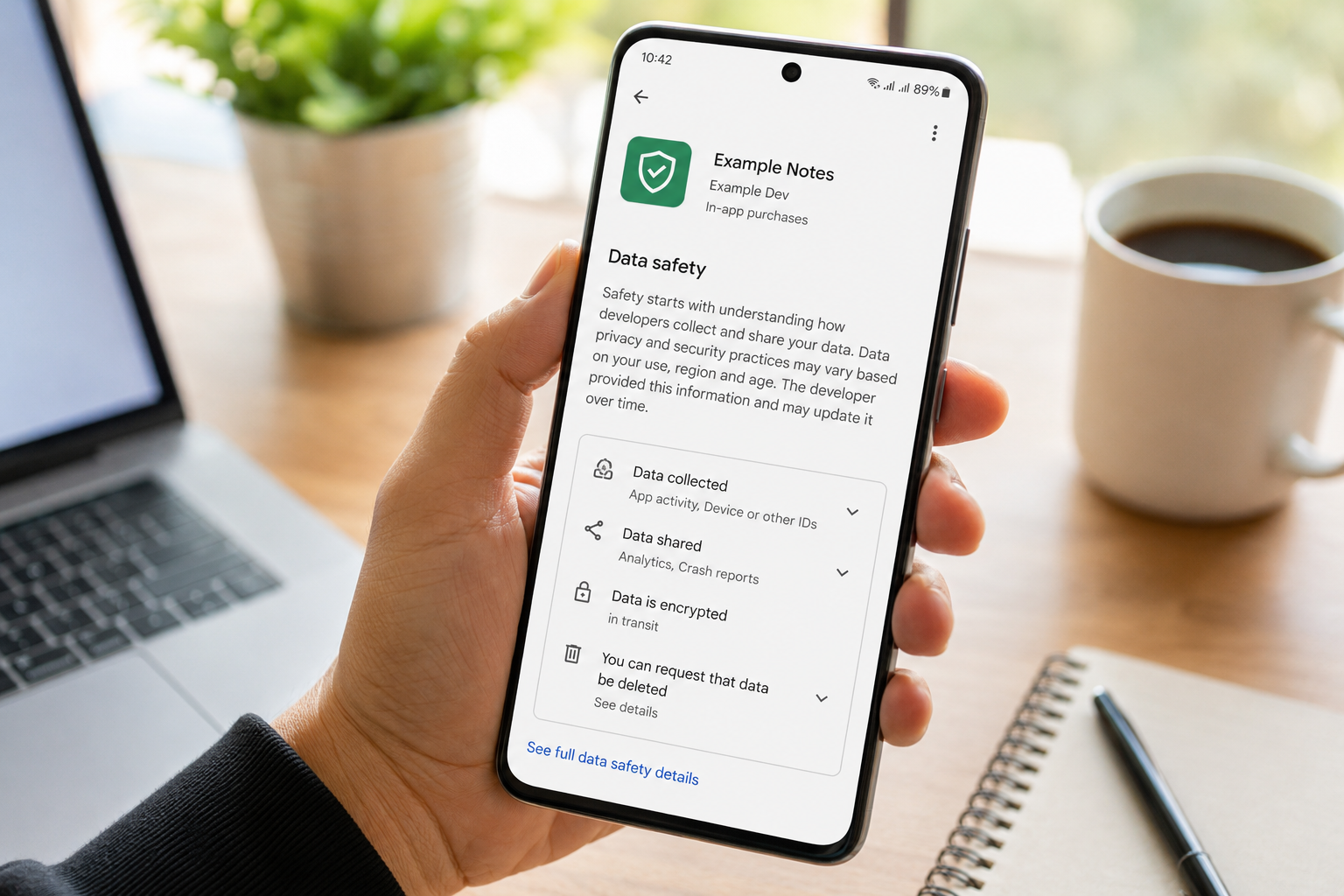
Quick Answer
Every time you install an app, some information leaves your phone. The important question is what information, why it is collected, and whether it stays with the developer or is shared with someone else.
Android doesn’t provide a single button that says, “This app shares your data with third parties.” Instead, you need to combine several clues. Looking at the Google Play Data Safety section, comparing permissions with the app’s purpose, understanding the privacy policy, and observing how the app behaves together provide a much clearer picture than relying on any one indicator.
The goal isn’t to find an app that collects zero data—very few modern apps do. The goal is to determine whether the data collection is reasonable, transparent, and necessary for the service the app provides.
Quick Overview
| Check | What It Reveals | Reliability |
|---|---|---|
| Google Play Data Safety | Developer-declared data collection and sharing | High (but self-reported) |
| Privacy Policy | How the developer describes data handling | High |
| Requested Permissions | What information the app can potentially access | Medium |
| App Purpose vs Permissions | Whether requests make logical sense | High |
| Developer Reputation | Past privacy practices and transparency | Medium |
| Background Activity | Possible ongoing communication with servers | Low alone, stronger when combined |
Table of Contents
Why This Question Matters More Than Ever
Many users believe privacy begins and ends with permissions. If an app doesn’t ask for Contacts or Location, they assume everything is safe.
Unfortunately, privacy is much more complicated than that.
Imagine two weather applications.
The first requests your location because it needs your city to display accurate forecasts.
The second asks for location, advertising ID, approximate device information, crash reports, usage analytics, and marketing identifiers.
Both technically provide weather forecasts.
Yet the amount of information surrounding that simple forecast can be completely different.
This illustrates an important principle:
The real privacy story is often hidden behind the feature you came to use.
Developers today integrate numerous software components from other companies. These components—commonly called Software Development Kits (SDKs)—can provide useful services such as crash reporting, analytics, notifications, fraud prevention, advertisements, subscriptions, cloud synchronization, and customer support.
Each additional service may require certain information to function properly.
That doesn’t automatically mean your privacy is being abused.
But it does mean understanding data sharing requires looking beyond permissions.
What Does “Third-Party Data Sharing” Actually Mean?
People often imagine data being “sold” whenever they hear this phrase.
In reality, third-party sharing covers several different situations.
Some examples include:
- Cloud infrastructure providers processing uploaded files.
- Analytics services measuring app performance.
- Payment processors completing purchases.
- Advertising networks displaying relevant advertisements.
- Crash reporting services diagnosing software problems.
- Authentication providers handling sign-in requests.
These companies may receive certain information because they perform a specific service for the app developer.
The important questions become:
- Is the sharing necessary?
- Is the user informed?
- Is the amount of data proportional to the feature?
- Does the developer explain why the information is shared?
Those questions reveal far more than simply asking whether sharing exists.
A Better Way to Think About Privacy
Instead of asking:
“Does this app share data?”
Ask four smarter questions:
- What information leaves my device?
- Who receives it?
- Why do they receive it?
- Could the app work without sending it?
This framework helps separate normal application behavior from unnecessary collection.
For example:
A navigation app sending location data to calculate directions is expected.
A flashlight application requesting continuous location tracking deserves additional attention.
The difference isn’t the permission itself.
The difference is whether the request matches the app’s purpose.
Step 1: Start With the Google Play Data Safety Section—But Don’t Stop There
Most guides simply say:
That advice is incomplete.
The Data Safety section should be treated as the starting point, not the final answer.
Open the application’s Google Play page and scroll until you find Data Safety.
You’ll usually see information such as:
- Data collected
- Data shared
- Security practices
- Whether data is encrypted
- Whether users can request deletion
Many people stop after reading the first sentence.
Instead, compare every statement with the app’s actual functionality.
Example
Suppose a simple note-taking app states it collects:
- Location
- Purchase history
- Device identifiers
- App interactions
- Advertising information
Ask yourself:
Does a basic note application genuinely require all of these?
Sometimes the answer is yes.
Often it deserves further investigation.
The purpose isn’t to accuse developers.
It’s to develop healthy curiosity.
One Detail Most People Completely Ignore
Here’s something surprisingly overlooked.
Many users focus on what information is collected.
Few examine how many different categories are collected.
Imagine two similar apps.
App A
Collects:
- Email address
- Password
App B
Collects:
- Phone number
- Device ID
- Approximate location
- Purchase history
- Search history
- Advertising ID
- Crash logs
- App interactions
- User-generated content
Neither list automatically proves anything negative.
However, the breadth of collection often tells you more than any individual permission.
Think of it like luggage.
One small backpack suggests a short trip.
Ten large suitcases suggest something much bigger is happening.
The same principle applies to data categories.
Don’t Confuse “Collected” With “Shared”
This misunderstanding causes countless privacy discussions online.
These two words are not interchangeable.
Data Collected
Information received by the developer for operating the app.
Data Shared
Information sent to another organization outside the developer for purposes such as advertising, analytics, or service delivery.
Sometimes an app collects information but never shares it externally.
Other times only certain categories are shared.
Reading these labels carefully provides much better context than simply searching for the word “tracking.”
A Small Change That Can Reveal a Big Difference
Many users compare different applications by ratings.
A better comparison is privacy behavior.
Imagine installing three calculator apps.
Instead of asking:
Which one has 4.8 stars?
Ask:
- Which collects fewer categories of data?
- Which explains collection clearly?
- Which allows account deletion?
- Which avoids unnecessary advertising identifiers?
- Which requests only the permissions expected for a calculator?
This habit often leads users toward simpler, more transparent applications.
Interestingly, apps with slightly fewer features sometimes have significantly smaller privacy footprints.
That trade-off may be worthwhile depending on your priorities.
Look Beyond Individual Permissions
Another common mistake is evaluating permissions one by one.
Privacy is often about combinations.
For example:
A permission to access your camera isn’t automatically concerning.
Neither is internet access.
Neither is storage access.
But when an app combines:
- Camera
- Microphone
- Contacts
- Background Location
- Advertising ID
- Continuous Internet Access
the overall picture becomes more important than any single permission.
Think of permissions as puzzle pieces.
Only when assembled do they reveal the complete image.
The “Feature Justification Test”
This is a practical method rarely discussed but surprisingly effective.
Instead of asking whether a permission is dangerous, ask yourself:
Can I explain this permission using one sentence that matches the app’s main feature?
Examples:
Camera app
“I need camera access to take photos.”
Makes sense.
Navigation app
“I need location to provide directions.”
Makes sense.
QR scanner
“I need the camera to scan codes.”
Makes sense.
Calculator
“I need continuous background location.”
That explanation is much harder to justify.
This simple mental exercise often reveals more than technical privacy terminology.
Read the Privacy Policy Like an Investigator, Not Like a Lawyer
Many users open a privacy policy, see thousands of words of legal language, and immediately close it.
That’s understandable.
Privacy policies are written primarily to explain legal responsibilities—not to make reading enjoyable.
Instead of trying to read every paragraph, become a detective.
You’re looking for clues.
The most useful approach is searching for specific words that often indicate relationships with outside companies.
Look for phrases such as:
- Service providers
- Third-party partners
- Analytics
- Advertising
- Marketing partners
- Cloud services
- Fraud prevention
- Payment processors
- Authentication
- SDK
- Business partners
- Personalization
- Measurement
- Attribution
- Cross-device
Finding these words doesn’t automatically indicate poor privacy.
Instead, they reveal where your information may travel after leaving your phone.
Pay Attention to Verbs, Not Just Nouns
Here’s something surprisingly overlooked.
Most people search for words like:
- Location
- Contacts
- Photos
Instead, pay attention to action words.
Examples include:
- Share
- Transfer
- Process
- Retain
- Store
- Analyze
- Improve
- Measure
- Personalize
- Combine
- Associate
These verbs explain what actually happens to your information.
For example:
“We collect device identifiers.”
tells you less than
“We combine device identifiers with advertising partners to measure campaign performance.”
The second sentence gives much more context.
Notice What Isn’t Explained
Transparency isn’t only about what companies disclose.
It’s also about what they leave vague.
Suppose a privacy policy says:
“Information may be shared with trusted partners.”
That raises another question.
Who are those partners?
Advertising companies?
Cloud providers?
Payment services?
Analytics platforms?
A trustworthy privacy policy often explains categories clearly instead of hiding everything behind general terms.
The “Specificity Test”
Here’s a simple technique few people use.
Imagine asking two mechanics the same question.
Mechanic A says:
“We’ll fix your car.”
Mechanic B says:
“We’ll replace the worn brake pads, inspect the rotors, and test the braking system.”
Which answer inspires more confidence?
Privacy policies work the same way.
Specific explanations generally indicate stronger transparency than vague promises.
Understand Why Apps Use SDKs
Modern apps rarely consist only of code written by the developer.
Instead, developers often integrate Software Development Kits (SDKs).
Think of SDKs as ready-made building blocks.
Instead of building every feature from scratch, developers use trusted services.
Examples include:
- Crash reporting
- Analytics
- Push notifications
- Cloud storage
- Maps
- Authentication
- Subscription management
- Customer support
- Advertising
- Fraud detection
These services save enormous development time.
However, every additional SDK may introduce additional data processing.
That doesn’t automatically mean excessive data sharing.
It simply means more organizations may participate in delivering the service.
More SDKs Doesn’t Always Mean Worse Privacy
This is an important distinction.
Many online discussions assume:
More SDKs = Bad app.
Reality isn’t that simple.
Imagine an educational app using:
- Google Sign-In
- Cloud backup
- Crash reporting
- Subscription management
Each exists for a legitimate feature.
Now compare another app with:
- Multiple advertising SDKs
- Several analytics SDKs
- Marketing attribution SDKs
- Behavioral profiling services
The difference isn’t quantity alone.
It’s purpose.
Always ask:
“What feature does this SDK support?”
If the answer is obvious, that’s reassuring.
If nobody can explain why it exists, investigate further.
The “Invisible Passenger” Principle
Most people judge an app only by what they see on the screen.
Privacy often involves features users never notice.
For example:
You open an app.
Nothing unusual happens.
Behind the scenes it may:
- Check for updates.
- Verify subscriptions.
- Synchronize settings.
- Record crash diagnostics.
- Measure loading speed.
- Retrieve advertisements.
- Validate purchases.
These background activities are normal in many apps.
The important question is whether they remain proportional to the app’s purpose.
Don’t Judge an App on Day One
Privacy isn’t frozen forever.
Apps evolve.
New features often introduce new data requirements.
A simple photo editor might later add:
- AI enhancement
- Cloud synchronization
- Community sharing
- Account login
- Premium subscriptions
Each new feature can legitimately change privacy practices.
Many users never revisit the Data Safety section after installing an app.
That’s a mistake.
A trustworthy privacy review should happen after major updates—not only during installation.
The “Privacy Drift” Effect
This is something surprisingly common but rarely discussed.
Privacy Drift happens when an app gradually changes over months or years.
Version 1:
Offline calculator.
Version 5:
Cloud backup.
Version 8:
AI assistant.
Version 12:
User accounts.
Version 18:
Personalized recommendations.
Version 25:
Advertising platform.
No single update appears dramatic.
But after years of continuous development, the privacy profile may look completely different from the original app.
That’s why experienced users occasionally revisit privacy information even for apps they’ve trusted for years.
Compare the Business Model With the Privacy Model
Instead of asking only:
“What data is collected?”
Ask:
“How does this company make money?”
Business models often explain privacy practices better than technical documentation.
Examples:
Subscription-based apps may primarily process payment information.
Advertising-supported apps may rely more heavily on advertising identifiers and usage analytics.
Enterprise software may prioritize authentication and organizational management.
Educational apps may focus on progress tracking.
Understanding revenue sources helps you predict why certain information is processed.
Be Careful With “Free”
Free doesn’t mean unsafe.
Paid doesn’t automatically mean private.
Instead, ask:
“If the app costs nothing to install, how does the developer fund continued development?”
Possible answers include:
- Advertisements
- Optional subscriptions
- Premium upgrades
- Donations
- Enterprise licensing
- Sponsorships
- Hardware sales
- Cloud services
None of these automatically indicate poor privacy.
They simply provide context for understanding data practices.
The Permission Timing Test
Another overlooked clue involves when permissions are requested.
Well-designed apps usually ask for access only when you attempt to use the related feature.
For example:
Opening the camera feature
↓
Camera permission appears.
That feels logical.
Compare that with an app requesting:
- Camera
- Contacts
- Microphone
- Location
immediately after installation before you’ve explored any features.
Early requests aren’t necessarily malicious, but they deserve closer attention.
Apps that explain why they’re requesting access often create greater confidence.
Create a Simple Privacy Score Before Installing
Instead of relying on intuition, use a checklist.
| Question | Yes | No |
|---|---|---|
| Does the app clearly explain collected data? | ✅ | ❌ |
| Do permissions match the main purpose? | ✅ | ❌ |
| Is there a detailed privacy policy? | ✅ | ❌ |
| Can you identify the developer? | ✅ | ❌ |
| Does the Data Safety section appear reasonable? | ✅ | ❌ |
| Is account deletion explained (if accounts exist)? | ✅ | ❌ |
You don’t need every answer to be perfect.
The goal is building confidence through multiple small observations rather than trusting a single indicator.
Privacy Is About Patterns, Not One Warning Sign
A single permission rarely proves anything.
One analytics SDK rarely proves anything.
One advertising library rarely proves anything.
Instead, look for patterns.
Several small concerns appearing together often deserve more attention than one isolated observation.
Think like a doctor.
Doctors rarely diagnose based on one symptom.
They evaluate the complete picture.
Privacy works the same way.
Observe How the App Behaves Over Time
Privacy isn’t only about what happens during installation.
Some of the most useful clues appear after you’ve been using the app for several days.
Ask yourself questions like:
- Does the app constantly ask you to sign in?
- Does it repeatedly encourage you to enable personalized recommendations?
- Does it frequently request permissions you previously denied?
- Does it suddenly introduce new features after updates that require additional information?
None of these automatically indicate poor privacy.
However, they help you understand whether the app’s data needs are expanding over time.
A privacy-conscious user doesn’t just inspect an app once—they occasionally re-evaluate it as it evolves.
Background Activity: A Clue, Not Proof
Some users believe that if an app appears active in the background, it must be sending personal information.
That conclusion is too simplistic.
Many legitimate reasons exist for background activity, including:
- Syncing saved data across devices.
- Downloading new content.
- Checking for updates.
- Refreshing widgets.
- Delivering notifications.
- Backing up information to the cloud.
At the same time, excessive or unexplained background communication may justify taking a closer look.
Think of background activity as a smoke alarm.
Smoke doesn’t always mean there’s a fire—but it does mean it’s worth checking.
The “Data Echo” Principle
Here’s an idea that many users overlook.
Every action inside an app can create a small “echo.”
For example:
- Searching for a product.
- Watching a video.
- Saving a favorite item.
- Completing a lesson.
- Reading an article.
- Adjusting app settings.
Some apps use these actions only to improve your personal experience.
Others may also use aggregated or anonymized usage information to improve the service, understand feature popularity, or measure performance.
The important distinction is whether the app clearly explains these practices and gives users meaningful control where appropriate.
Don’t Ignore the Developer
Many users carefully compare apps but never compare the companies behind them.
Before installing an unfamiliar app, ask:
- Does the developer publish other apps?
- Are those apps actively maintained?
- Is contact information available?
- Is there a professional website?
- Does the privacy policy identify the company clearly?
Transparency often reflects maturity.
Developers who clearly explain who they are and how users can contact them generally inspire more confidence than anonymous publishers with little information.
Compare Similar Apps Before Choosing
Privacy should be one of your comparison criteria.
Suppose three apps perform the same task.
Instead of comparing only:
- Ratings
- Downloads
- Screenshots
Also compare:
- Data categories collected.
- Data categories shared.
- Required permissions.
- Sign-in requirements.
- Availability of account deletion.
- Frequency of updates.
- Privacy policy clarity.
Sometimes two apps deliver almost identical features, but one requests significantly less information.
That can be the better long-term choice.
Questions Worth Asking Before Installing Any App
Instead of immediately tapping Install, pause for a moment and ask yourself:
- What problem does this app solve?
- Does it need an account to provide that feature?
- Which permissions genuinely make sense?
- Would I still install it if I understood exactly how my data is used?
- Are there similar apps with fewer privacy compromises?
This short reflection often prevents unnecessary installations.
Red Flags That Deserve Attention
No single warning sign proves an app is unsafe.
However, several together should encourage further research.
| Observation | Why It Matters |
|---|---|
| No visible privacy policy | Users cannot understand how data is handled. |
| Permissions unrelated to the app’s purpose | The requests may require closer examination. |
| Very vague explanations | Transparency becomes difficult to evaluate. |
| Unknown developer with little public information | Trust becomes harder to establish. |
| Frequent permission requests without explanation | Users may struggle to make informed choices. |
| Major privacy changes after updates | Reassess whether the app still matches your expectations. |
Common Myths About App Data Sharing
Myth 1: Every Free App Sells Your Data
Not necessarily.
Many free apps rely on advertising, optional subscriptions, sponsorships, or premium upgrades rather than selling user information.
Always judge the individual app—not the pricing model alone.
Myth 2: No Permissions Means Complete Privacy
Incorrect.
An app can still process information such as device characteristics, crash reports, or general usage analytics without requesting sensitive permissions like Contacts or Camera.
Permissions are only one part of the privacy picture.
Myth 3: Paid Apps Never Collect Data
Paying for an app doesn’t automatically eliminate analytics, cloud synchronization, or account management.
Many paid apps still process information necessary to deliver their services.
Myth 4: Uninstalling an App Deletes Everything
Removing the app from your phone doesn’t always remove information already stored on the developer’s servers.
If you’ve created an account, check whether the app provides an option to delete the account and associated data.
Myth 5: A Popular App Must Be Safe
Millions of downloads indicate popularity—not necessarily privacy quality.
Even widely used apps should be evaluated using the same careful approach.
A Practical Decision Framework
Instead of asking:
“Is this app completely private?”
Ask:
Step 1
Does the app clearly explain what information it collects?
↓
Step 2
Do the requested permissions match the app’s purpose?
↓
Step 3
Does the privacy policy answer important questions instead of avoiding them?
↓
Step 4
Does the developer appear transparent and trustworthy?
↓
Step 5
Would you still feel comfortable using the app if a friend explained its data practices exactly as described?
If you can answer “yes” to most of these questions, you’ve probably made a well-informed decision.
Simple Privacy Habits That Make a Big Difference
Rather than searching for the “perfect” app, develop habits that improve your privacy over time.
- Install only apps you genuinely need.
- Review permissions occasionally instead of only during installation.
- Remove apps you no longer use.
- Revisit privacy information after major feature updates.
- Prefer developers who explain their practices clearly.
- Compare privacy information before choosing between similar apps.
- Keep Android and your apps updated to receive the latest security improvements.
These habits are often more effective than trying to find a single privacy setting that solves everything.
Frequently Asked Questions
Can Android tell me exactly which apps share my data?
No. Android doesn’t provide a single system screen that confirms all third-party data sharing. Instead, you need to evaluate several sources, including the Google Play Data Safety section, the app’s privacy policy, and the permissions it requests.
Does the Google Play Data Safety section guarantee complete accuracy?
The information is provided by the developer and helps users understand declared data practices. It is a valuable starting point, but it should be considered alongside other information such as the privacy policy and the app’s overall behavior.
Is data collection always a bad thing?
No. Many apps must process certain information to provide their core features. The key question is whether the collection is appropriate, transparent, and proportional to the service offered.
Should I avoid every app that uses analytics?
Not necessarily. Analytics can help developers understand crashes, improve performance, and fix bugs. The important factor is whether the app explains these practices clearly and limits collection to what is reasonably necessary.
Can two similar apps have very different privacy practices?
Yes. Two apps offering nearly identical features may request different permissions, collect different categories of information, and use different third-party services. Comparing them before installation can help you make a more informed choice.
Final Recommendation (TNAPK)
Checking whether an app shares data with third parties isn’t about finding a single warning sign. It’s about understanding the complete picture.
Instead of relying on one permission or one privacy statement, combine several observations. Compare the app’s purpose with its permissions, read the Google Play Data Safety section carefully, look for clear explanations in the privacy policy, and consider the developer’s transparency.
The most privacy-friendly app isn’t always the one that collects the least information. It’s often the one that explains its practices honestly, collects only what is necessary for its features, and gives users meaningful control over their information.
A few extra minutes of research before installing an app can help you make more confident decisions and better protect your personal data over the long term.
Keep Exploring
Discover more reviews, guides, and comparisons to help you choose the right Android apps.
 How to Compare Similar Apps Like an Expert (27 Checks)
Published: 27 Jul 2026 • 01:23 PM Updated: 27 Jul 2026 • 01:23 PM Reading: 7 min read...
How to Compare Similar Apps Like an Expert (27 Checks)
Published: 27 Jul 2026 • 01:23 PM Updated: 27 Jul 2026 • 01:23 PM Reading: 7 min read...
 How to Choose the Right Android App Before Downloading: A Practical Decision Guide (2026)
Published: 25 Jul 2026 • 04:45 PM Updated: 25 Jul 2026 • 04:45 PM Reading: 7 min read...
How to Choose the Right Android App Before Downloading: A Practical Decision Guide (2026)
Published: 25 Jul 2026 • 04:45 PM Updated: 25 Jul 2026 • 04:45 PM Reading: 7 min read...
 What Happens When You Delete an App? The Complete Android Guide
Published: 17 Jul 2026 • 12:09 AM Updated: 17 Jul 2026 • 12:09 AM Reading: 47 min read...
What Happens When You Delete an App? The Complete Android Guide
Published: 17 Jul 2026 • 12:09 AM Updated: 17 Jul 2026 • 12:09 AM Reading: 47 min read...
 Remove Unused App Permissions on Android for Better Privacy
Published: 15 Jul 2026 • 06:31 PM Updated: 15 Jul 2026 • 06:32 PM Reading: 24 min read...
Remove Unused App Permissions on Android for Better Privacy
Published: 15 Jul 2026 • 06:31 PM Updated: 15 Jul 2026 • 06:32 PM Reading: 24 min read...