Quick Answer
In the WhatsApp wallpaper vs chat theme comparison, a wallpaper supplies the background picture, while WhatsApp’s theme controls can coordinate the background and message colors. Wallpapers for WhatsApp Chat by Fivex Solution is an optional image catalogue. It is most relevant when you want more pictures to browse; WhatsApp already provides the controls for applying a background or choosing a theme.
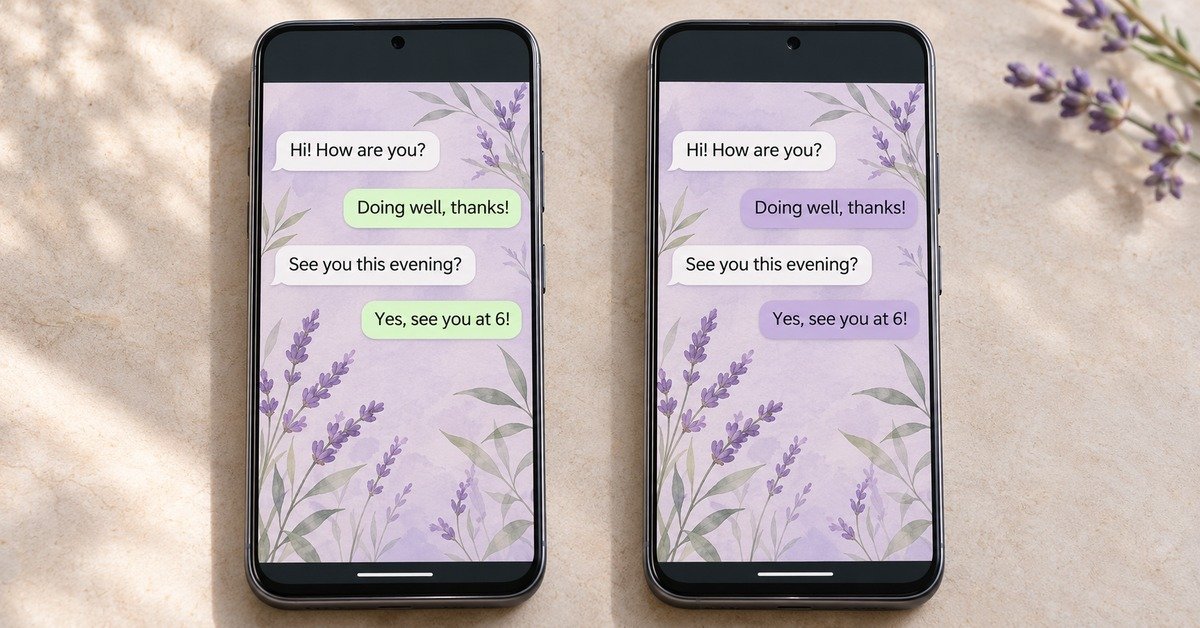
You find a purple wallpaper, save it, and expect a completely purple conversation. Instead, the background changes while the message bubbles keep their previous color. Perhaps you also expected the phone’s home screen to match. The picture may have worked exactly as intended, even though the result was different from what you imagined.
The word “theme” can describe several things: a background image, a coordinated chat appearance, or changes to the wider phone interface. Those choices belong to different settings. Understanding which part you want to change is more useful than installing another app with “wallpaper” or “theme” in its name.
Wallpapers for WhatsApp Chat, published by Fivex Solution, fits into the picture-finding part of this process. The developer describes browsing categories, downloading an image, and using the saved file in WhatsApp. That makes the app worth judging as a collection of images rather than expecting it to manage every visual setting.
Your routine matters too. Someone choosing one family photo has different needs from someone who enjoys searching for a fresh illustration every week. This comparison explains the available routes, shows how to try a design without changing everything at once, and offers a practical way to decide whether a separate catalogue deserves space on your Android phone.
Quick Overview: Choose the Setting That Matches the Change
| What you want to change | Where to start |
|---|---|
| The picture behind messages | WhatsApp’s wallpaper selection. |
| The color of message bubbles | WhatsApp’s chat-color controls. |
| A coordinated background and color scheme | A WhatsApp chat theme. |
| The look of a particular conversation | That conversation’s individual theme settings. |
| The phone’s home or lock-screen background | Your phone’s wallpaper settings. |
| A wider selection of background images | An optional wallpaper catalogue or your own photo collection. |
A Picture, a Chat Theme, and an Image Catalogue Serve Different Purposes
A Wallpaper Is the Visual Material
A downloaded wallpaper is an image you can select as a background. Its colors, subjects, and patterns are part of that file. Downloading a blue image does not, by itself, instruct WhatsApp to recolor its message bubbles blue.
The same distinction applies to a personal photograph. Selecting a picture of your family supplies the background; it is not a package of instructions for changing the whole application.
A Chat Theme Is an Appearance Choice Inside WhatsApp
WhatsApp describes themes that change the chat background and bubble colors together. It also offers ways to mix background and color choices. That is the appropriate place to look when you want a coordinated conversation design.
The official chat-theme announcement explains these options and confirms that the resulting theme is visible to you. It is not automatically a shared design imposed on the person you are messaging.
A Catalogue Helps You Find the Picture
Fivex Solution’s app sits before the application stage. It advertises collections such as abstract designs, flowers, gradients, illustrations, and other visual styles. You browse for an image, then use WhatsApp to place it.
Its main potential benefit is discovery. Whether that benefit justifies another installed app depends on the pictures available and how often you return to choose more.
Four Common Goals—and the Route That Fits
“I Want One Personal Photo Behind a Chat”
Begin with the photo you already have. Preview its position in WhatsApp and check whether the subject remains visible around the messages. A catalogue adds little if finding a new picture was never your problem.
“I Want the Background and Bubbles to Match”
Explore WhatsApp’s theme and color options. You can assess a coordinated preset before deciding whether you need a different background image. Choose the appearance tools first, then look for additional artwork if the included choices do not suit you.
“I Enjoy Browsing New Background Styles”
A categorized collection may be useful. For example, you might compare a soft gradient with a floral illustration without searching several unrelated sources. Try one actual download before assuming the full browsing experience meets your needs.
“I Want to Redesign My Phone”
A conversation background is only one visual area. Home-screen wallpaper, lock-screen appearance, keyboard customization, and WhatsApp chat themes have separate controls. Check the particular app or phone feature responsible for the area you want to change.
TNAPK’s guide to choosing an Android app offers a broader way to match a download to a specific task.
Try One Conversation Before Changing Your Default
A small trial makes the result easier to understand. The following route uses WhatsApp’s documented settings alongside the wallpaper app’s described download process.
- Start with a single chat. On Android, open its three-dot menu and choose Chat theme.
- Inspect an included theme. Decide whether you like its overall appearance before searching elsewhere.
- Bring in another image only if needed. In the Fivex app, browse Chat Wallpapers and save a chosen image. Confirm that the file opens in your gallery.
- Use the chat’s Wallpaper option. Select the saved image through the available photo choice, preview it, and confirm.
- Check color separately. If the background is right but the bubbles are not, review WhatsApp’s chat-color setting.
For a default choice, current guidance points to Settings → Appearance → Default chat theme. Some versions use a Chats section. Consult the WhatsApp Help Center for your available layout.
The app listing includes an older Wallpaper → Change → My Photos route. Different wording does not necessarily mean the downloaded image is incompatible.
Choose the Image and Color as Two Decisions
Suppose you like a detailed botanical background but find the conversation visually crowded. There are two things to assess: how much detail is in the picture, and how the message bubbles sit against it.
Changing several controls at once makes it harder to understand which adjustment helped. First compare the same image with the available color options. Then, if the screen still feels busy, try a simpler picture.
Useful combinations to consider include:
- A personal photograph with quieter colors: keep attention on the subject without making every visible area equally busy.
- An illustrated pattern with clear message separation: judge the result with both incoming and outgoing messages visible.
- A plain or softly graded background: useful when reading comfort matters more than decorative detail.
These are design suggestions, not tested performance claims. The right result depends on your preferences and how the conversation looks on your screen.
Check the Actual Image You Are Saving
A promotional screenshot may contain chat bubbles, category buttons, or decorative frames that are not part of the downloadable wallpaper. Use the app’s download action and open the resulting file to see what you really received.
That check also prevents a common workaround from creating a new problem: taking a screenshot of an app preview can capture controls and reduce the usable detail once the picture is cropped again.
Keep the original image you intend to reuse in an identifiable folder. You can then compare designs without repeatedly downloading similar files or relying on a small catalogue thumbnail.
Does the Extra App Earn Its Place on Your Phone?
Judge the catalogue after completing a real task, rather than only browsing attractive previews. Ask whether you found a picture you preferred, whether the download worked, and whether returning to the app is worth your time.
If you often enjoy choosing backgrounds, those benefits may justify keeping it. If you found one image and rarely change it, you may have finished the task that brought you to the catalogue.
The listing marks the app as advertising-supported. We have not measured ad frequency or confirmed the access conditions for every image, so an interruption-free experience should not be assumed.
Privacy: Read the Store Declaration and the Permission Request Separately
The developer’s Play disclosure declares no collection or third-party sharing, reports encryption during transmission, and indicates that data deletion is unavailable. These statements are supplied by the publisher; they are not results from our own privacy testing.
Permissions answer a different question: what access are you allowing on your device? A store declaration does not remove the need to examine a permission prompt.
Where Android offers its system Photo Picker, you can select particular media instead of sharing an entire collection. Availability depends on the app and device. Access should make sense for the action you chose.
You can revisit permissions through the app’s entry in Android Settings. Google documents those controls, and TNAPK’s permission decision guide explains how to assess requests by purpose.
The developer-linked policy is included in the app card below. We could not independently examine its text during this review, so we do not present the app as comprehensively audited or completely private.
Limits of This Wallpaper App
- Its described job is image discovery and download. The listing does not establish control over every WhatsApp appearance setting.
- The preview is only a starting point. The downloaded file and the applied conversation can look different.
- A category label does not guarantee a suitable design. Review the picture you choose rather than judging the entire collection by its name.
- Current compatibility still needs checking. The store page shows an update date of 30 September 2024; that date alone neither proves a problem nor confirms every current phone works.
Who Should Consider It—and Who Should Skip It?
Consider it if you actively want another source of background artwork and are comfortable assessing the collection, advertising, and permission requests for yourself.
Skip it if you only need to change bubble colors, already have your preferred image, or want a setting that changes the other person’s phone. Those needs are not solved by browsing another wallpaper catalogue.
Decision Table: Your Goal and the Practical Choice
| Your goal | Practical choice |
|---|---|
| A coordinated conversation appearance | Try a WhatsApp theme first. |
| One existing photograph as a background | Use the image directly from your photo collection. |
| More artwork to explore regularly | Evaluate the Fivex catalogue with one successful download. |
| A different bubble color with the same picture | Review WhatsApp’s chat-color controls. |
| New home-screen or lock-screen styling | Use the relevant phone wallpaper controls. |
Bonus App Card: Wallpapers for WhatsApp Chat
| Publisher | Fivex Solution |
|---|---|
| App title | Wallpapers for WhatsApp Chat |
| Official installation page | View the Google Play listing |
| System / store category | Android / Entertainment |
| Cost information | Install listing with advertising; review any offer shown on your device. |
| Download bracket | 1M+ displayed when checked on 3 November 2026. |
| User rating | Consult the live regional store page. |
| Update listed | 30 September 2024. |
| Release, version, minimum Android and download size | Check App info on the official listing; these fields were not independently confirmed. |
| Developer contact | fivexsolution@gmail.com |
| Privacy document | Open the publisher’s linked policy. |
| Advertised function | A categorized background collection with image downloads for selecting in WhatsApp. |
How to Uninstall When You Finish
To remove the catalogue, locate it under Google Play’s Manage apps & devices section. Select its entry in Manage, then use Uninstall. The process is covered in Google’s app-deletion help.
Before cleaning up downloaded files, preserve any image you want to select again. If your aim is to replace the current chat background, make that choice within WhatsApp’s appearance controls.
For wider questions about saved files and application removal, see what happens when you delete an Android app.
Frequently Asked Questions
Why are my bubbles still green after I choose a purple wallpaper?
The image supplies the background’s colors. Use WhatsApp’s separate chat-color or theme options to review supported bubble colors.
Can I combine an external picture with WhatsApp’s own color choices?
WhatsApp provides wallpaper and chat-color controls. Preview the combination after each choice, especially if you select a preset theme that changes both elements.
Do I need to download the same picture again for another chat?
You can select the same accessible image file when customizing another conversation. There is no need to obtain another copy merely to make a separate chat selection.
Will a wallpaper catalogue also change my keyboard and home screen?
The reviewed workflow concerns images selected for WhatsApp chats. Keyboard appearance and home-screen wallpaper belong to their own settings; those changes are not established features of this app.
Can I make someone else’s chat match my design?
Your theme choice is local to your view. If you want a coordinated look, the other person needs to choose their own settings rather than expecting your background selection to change theirs.
Is there a reason to keep two wallpaper apps installed?
Only if both collections provide something you actually use. Compare the designs and the effort involved in getting a usable image; keep additional catalogues because they serve a purpose, not because a theme change requires them.
Final Verdict
The useful answer to WhatsApp wallpaper vs chat theme is to choose the control that matches your goal. Use a picture for the background, WhatsApp’s theme settings for a coordinated chat appearance, and a separate catalogue when you want help finding the picture.
Wallpapers for WhatsApp Chat may suit regular wallpaper browsers. Its advertised collection does not make another installation essential for everyone. Try WhatsApp’s available options, evaluate one image if you need more choice, and keep the additional app only when its browsing value works for you.
Editorial disclosure: TNAPK prepared this comparison from official product information and practical analysis, checked on 3 November 2026. The examples are explanatory, and no hands-on test of the featured catalogue is claimed. Confirm current settings, access conditions, privacy information, and device compatibility before relying on a feature.
Keep Exploring
Discover more reviews, guides, and comparisons to help you choose the right Android apps.
 How to Use Notes Vault to Hide Videos and Audio
Published: 28 Oct 2026 • 02:21 AM Updated: 28 Oct 2026 • 02:21 AM Reading: 7 min read...
 What Is an International Calling App?
Published: 26 Oct 2026 • 01:28 AM Updated: 26 Oct 2026 • 01:28 AM Reading: 8 min read...
 Fingerprint Live: What to Know Before Installing
Published: 23 Oct 2026 • 12:54 PM Updated: 23 Oct 2026 • 12:54 PM Reading: 9 min read...
 What Is a Mobile Vault? Calendar Vault Features and Privacy Explained
Published: 22 Oct 2026 • 01:19 AM Updated: 22 Oct 2026 • 01:19 AM Reading: 7 min read...