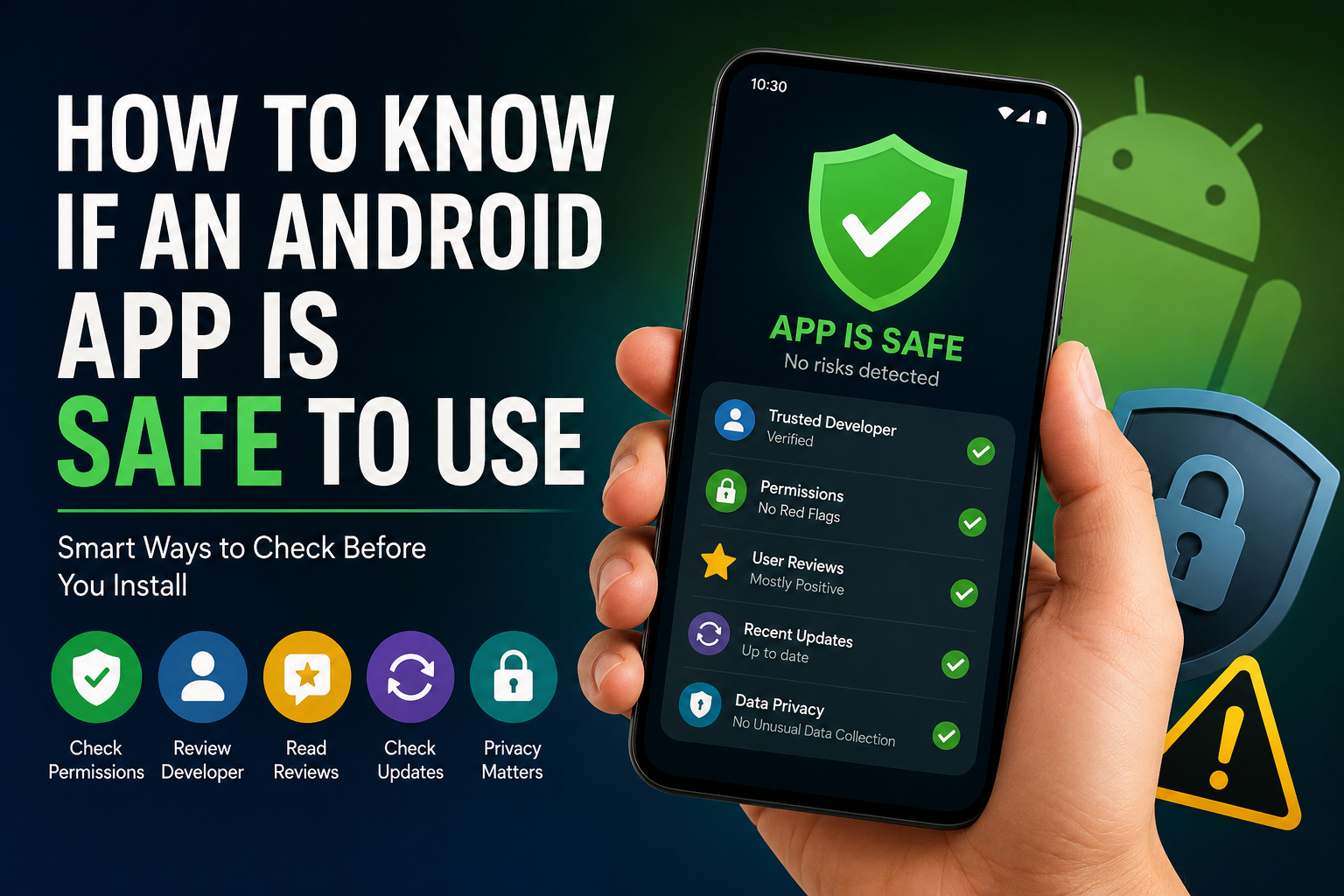
Every day, thousands of Android apps are downloaded by people looking for entertainment, productivity, shopping, education, banking, fitness, and communication tools. Most users assume that if an app appears in the Google Play Store, it must be completely safe.
Unfortunately, that is not always true.
The reality is that app safety is no longer just about avoiding malware. Today, some apps may not contain harmful code, yet they can still create privacy concerns, collect unnecessary data, show excessive advertisements, encourage unwanted subscriptions, or provide a poor overall user experience.
This is why knowing how to evaluate an Android app before installing it has become an important digital skill.
Instead of relying on a single indicator such as ratings or download numbers, smart users look at multiple trust signals before deciding whether an app deserves a place on their device.
This guide explains practical ways to evaluate Android apps and avoid common mistakes that many users make.
Table of Contents
What Does “Safe” Really Mean?
Many people define safety as “an app without viruses.”
While malware protection is important, modern app safety involves much more than that.
A safe Android app should ideally:
- Perform the task it promises
- Respect user privacy
- Request reasonable permissions
- Avoid misleading practices
- Receive ongoing maintenance
- Handle user data responsibly
- Clearly explain subscriptions or purchases
An app can technically be malware-free while still creating privacy, security, or trust concerns.
Because of this, evaluating an app requires looking beyond simple star ratings.
Start With the Developer, Not the App
Most users immediately focus on screenshots and features.
A better approach is to look at the developer first.
Ask yourself:
- Does the developer have multiple published apps?
- Do those apps appear related to the same category?
- Does the developer maintain a consistent identity?
- Are other apps from the same developer receiving updates?
Developers who build a long-term reputation usually have a more consistent record than developers who continuously publish unrelated apps with little support.
This does not mean new developers are unsafe. It simply means users should spend more time evaluating unfamiliar publishers.
Download Numbers Can Be Misleading
Many people believe:
More downloads = safer app.
That assumption is not always accurate.
High download counts can indicate popularity, but popularity alone does not guarantee quality, privacy, or reliability.
Before trusting an app solely because it has millions of installs, consider:
- How recently it was updated
- What users are saying today
- Whether complaints are increasing
- Whether recent versions introduced new problems
A popular app can still make changes that users dislike.
The safest decision comes from evaluating multiple factors together rather than relying on a single statistic.
Read the Worst Reviews First
Most users read positive reviews.
That sounds logical, but it often hides important information.
Instead, open the one-star and two-star reviews.
Look for repeated complaints such as:
- Excessive advertisements
- Battery drain
- Hidden subscription charges
- Account issues
- Login failures
- Data loss
- Performance problems
- Unexpected permission requests
A few negative reviews are normal.
However, if hundreds of users are reporting the same issue repeatedly, that pattern deserves attention.
Patterns usually reveal more than ratings.
Check the Update History
One of the most overlooked app safety indicators is update activity.
Apps need ongoing maintenance because:
- Android changes regularly
- Security vulnerabilities are discovered
- Bugs require fixes
- Device compatibility evolves
An app that has not been updated for a very long time may still function, but it could become increasingly unreliable.
Look for signs such as:
- Recent updates
- Bug fixes
- Performance improvements
- Security improvements
- Compatibility updates
Regular maintenance often indicates that the developer actively supports the product.
Make Sure Permissions Match the App’s Purpose
Permissions are important, but many guides stop there.
The real question is:
Do the permissions make sense?
Examples:
Reasonable Requests
A navigation app requesting location access.
A camera app requesting camera access.
A voice recorder requesting microphone access.
Potential Concerns
A calculator requesting contact access.
A flashlight requesting extensive permissions.
A wallpaper app requesting unnecessary device information.
Not every permission request is suspicious, but users should understand why access is being requested.
If the purpose is unclear, investigate further before installing.
Evaluate the Business Model
This is something many users overlook.
Ask yourself:
How does this app make money?
Understanding the business model often reveals how the app operates.
Common approaches include:
- Advertisements
- Subscriptions
- One-time purchases
- Premium upgrades
- Business services
Problems can arise when apps rely on aggressive monetization methods such as:
- Constant full-screen ads
- Difficult cancellation processes
- Confusing subscription screens
- Excessive upselling
Apps that respect users usually explain costs clearly and avoid manipulative tactics.
Look for Signs of Long-Term Support
Safe apps are often supported over time.
Look for evidence that the developer is invested in maintaining the product.
Helpful signs include:
- Detailed update notes
- Developer responses to feedback
- New features over time
- Ongoing improvements
An actively maintained app is generally easier to trust than one that appears abandoned.
Don’t Ignore the Privacy Section
Many users skip privacy information entirely.
While privacy policies can be lengthy, the data safety information can still provide useful clues.
Ask:
- What information does the app collect?
- Why is that information needed?
- Does the data collection align with the app’s purpose?
For example:
A weather app may reasonably require location information.
A note-taking app may need storage access.
However, users should be cautious when data collection seems unrelated to the app’s core function.
The goal is not to avoid all data collection.
The goal is to understand whether the data collection appears reasonable.
Watch for Fake Trust Signals
One of the biggest mistakes users make is trusting appearance over evidence.
Some apps look extremely professional.
They may have:
- Attractive screenshots
- Polished descriptions
- High ratings
- Large download counts
While these signals can be positive, they should not be treated as proof of safety.
The most reliable approach is combining multiple trust indicators rather than relying on a single metric.
Think of app safety as a puzzle where every piece contributes to the bigger picture.
Use the “Trust Test”
Before installing an app, ask yourself a simple question:
Would I feel comfortable giving this app access to my personal information?
Consider:
- Your primary email address
- Your phone number
- Your photos
- Your location
- Your payment details
If something feels wrong, spend more time researching before proceeding.
This simple mental check often helps users identify concerns they might otherwise ignore.
Safety Checks Should Continue After Installation
Many people stop evaluating an app once it is installed.
That is a mistake.
Apps can change over time through updates.
Pay attention to signs such as:
- Sudden increases in advertisements
- Unexpected permission requests
- Excessive battery usage
- Unusual background activity
- Frequent crashes
- Subscription changes
If an app begins behaving differently than expected, it may be worth reviewing its permissions or removing it entirely.
Common Mistakes Android Users Make
Many app-related problems happen because users:
- Install apps without reading reviews
- Ignore permission requests
- Trust download numbers alone
- Skip update history checks
- Accept permissions automatically
- Ignore privacy information
- Install multiple duplicate apps from unknown publishers
Avoiding these habits can significantly improve your overall app safety.
A Smarter Way to Decide
Instead of asking:
Is this Android app safe?
Ask:
Has this app earned my trust?
Review:
- Developer credibility
- User feedback patterns
- Update history
- Permission logic
- Privacy practices
- Monetization approach
- Long-term support
When several trust signals point in a positive direction, users can make more informed installation decisions.
Final Thoughts
Knowing whether an Android app is safe to use is no longer about finding a virus-free application. Modern app safety involves understanding how an app handles data, how the developer operates, how the app generates revenue, and whether it continues to earn user trust over time.
The safest users are not necessarily the most technical users. They are the users who take a few extra minutes to evaluate an app before installing it.
By checking the developer, reading review patterns, examining permissions, understanding privacy practices, and monitoring app behavior after installation, you can make better decisions and reduce the chances of downloading apps that create problems later.
In a world with millions of Android apps available, trust is one of the most valuable indicators you can use.
Keep Exploring
Discover more reviews, guides, and comparisons to help you choose the right Android apps.
 What Is an International Calling App?
Published: 26 Oct 2026 • 01:28 AM Updated: 26 Oct 2026 • 01:28 AM Reading: 8 min read...
What Is an International Calling App?
Published: 26 Oct 2026 • 01:28 AM Updated: 26 Oct 2026 • 01:28 AM Reading: 8 min read...
 Fingerprint Live: What to Know Before Installing
Published: 23 Oct 2026 • 12:54 PM Updated: 23 Oct 2026 • 12:54 PM Reading: 9 min read...
Fingerprint Live: What to Know Before Installing
Published: 23 Oct 2026 • 12:54 PM Updated: 23 Oct 2026 • 12:54 PM Reading: 9 min read...
 What Is a Mobile Vault? Calendar Vault Features and Privacy Explained
Published: 22 Oct 2026 • 01:19 AM Updated: 22 Oct 2026 • 01:19 AM Reading: 7 min read...
What Is a Mobile Vault? Calendar Vault Features and Privacy Explained
Published: 22 Oct 2026 • 01:19 AM Updated: 22 Oct 2026 • 01:19 AM Reading: 7 min read...
 CRED App Review (2026): Is It the Best Credit Card Payment App?
Published: 10 Jul 2026 • 12:34 AM Updated: 10 Jul 2026 • 12:34 AM Reading: 9 min read...
CRED App Review (2026): Is It the Best Credit Card Payment App?
Published: 10 Jul 2026 • 12:34 AM Updated: 10 Jul 2026 • 12:34 AM Reading: 9 min read...