Quick Overview
| Feature | Details |
|---|---|
| App Name | Rx Easy Prescription Maker |
| Developer | MAXI Applications |
| Category | Medical Productivity |
| Platform | Android |
| Pricing Model | Free download with additional features available through activation |
| Availability | Google Play Store |
| Best For | Doctors, private clinics, medical centers, healthcare professionals |
| Official Download Source | Google Play Store |
Table of Contents
Why Are Doctors Looking for a Better Prescription App?
Many clinics still struggle with handwritten prescriptions, scattered patient records, and inconsistent documentation. While paper prescriptions are familiar, they can create practical challenges:
- Difficult handwriting
- Lost patient records
- Repeated data entry
- Slow prescription preparation
- Printing inconsistencies
- Limited access across devices
For busy doctors, even small inefficiencies can add up throughout the day.
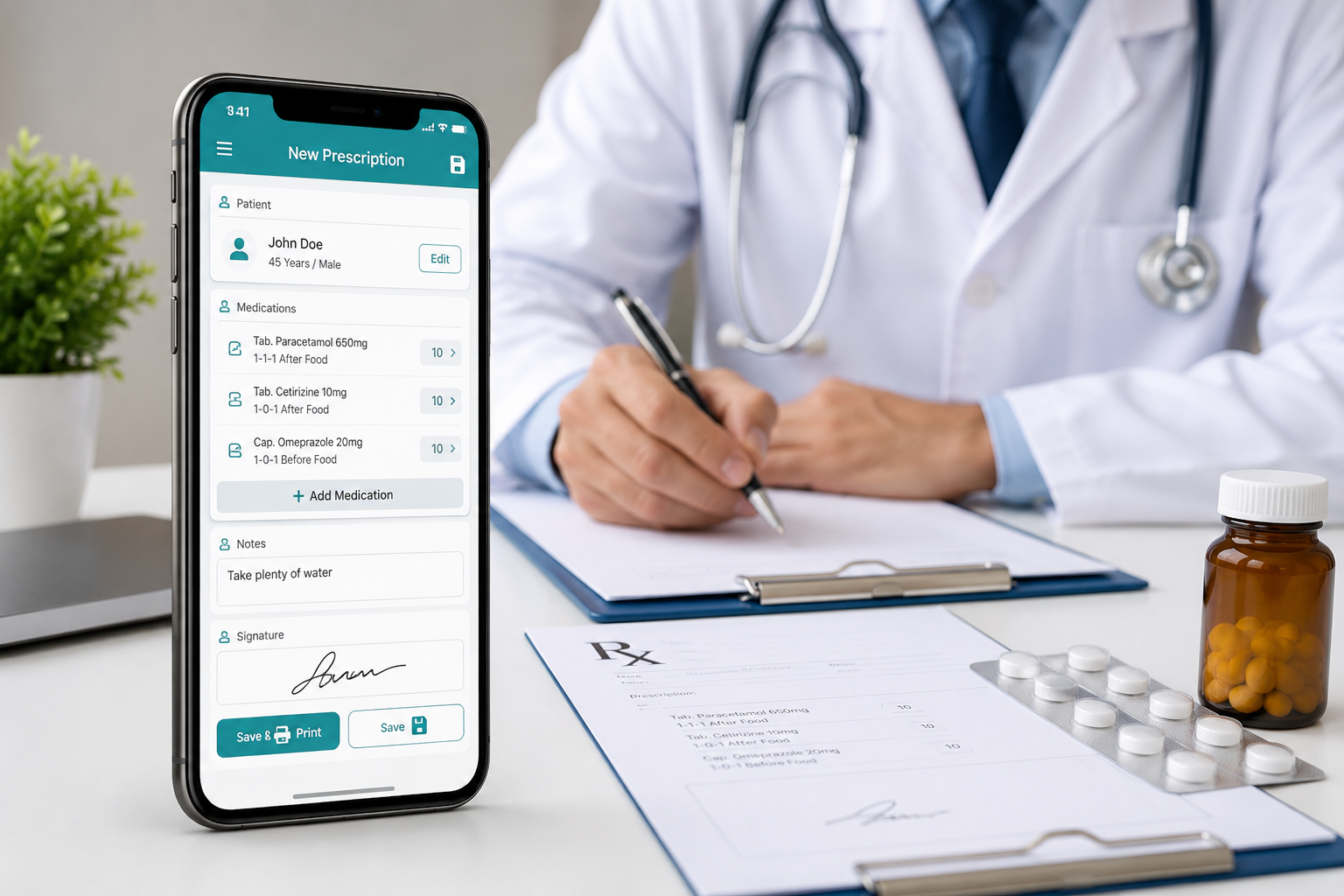
This is where prescription management apps attempt to simplify daily clinical work. Rx Easy Prescription Maker is one such solution designed specifically for doctors who want a digital way to create, store, and print prescriptions.
But is it actually worth using in a real clinical environment?
Let’s look beyond the marketing claims.
What Is Rx Easy Prescription Maker?
Rx Easy Prescription Maker is an Android-based prescription creation and management app designed primarily for healthcare professionals.
The app focuses on three core tasks:
- Creating prescriptions
- Managing patient information
- Printing professional-looking prescription documents
Unlike general note-taking apps, Rx Easy is built around clinical workflows. The interface includes patient information fields, medication databases, prescription templates, and printing tools.
From the screenshots and available information, the app appears to target:
- Individual doctors
- Small clinics
- Medical centers
- Specialist practices
- Healthcare assistants supporting physicians
The app can also function without an active internet connection after activation, which may be useful in areas where connectivity is unreliable.
What Problem Does This App Solve?
The biggest value of Rx Easy is not simply generating prescriptions.
Its real purpose is reducing repetitive administrative work.
Consider a typical outpatient clinic:
A doctor may see dozens of patients per day. Writing prescriptions manually, searching medication names repeatedly, and organizing patient records can consume valuable time.
Rx Easy attempts to streamline this process by providing:
- Prescription templates
- Saved medication databases
- Patient information storage
- Reusable doctor profiles
- Digital prescription printing
The goal is to make routine documentation faster and more consistent.
For doctors running busy practices, this may translate into smoother workflows and fewer clerical interruptions.
How Does the Prescription Printing System Work?
One of the strongest aspects of Rx Easy appears to be its prescription printing capabilities.
The application allows doctors to generate formal prescription documents rather than relying on handwritten notes.
Practical benefits include:
| Benefit | Why It Matters |
|---|---|
| Clear medication instructions | Reduces reading errors |
| Professional appearance | Improves clinic presentation |
| Consistent formatting | Easier patient understanding |
| Faster prescription generation | Saves consultation time |
| Easy record retention | Useful for future visits |
Doctors who frequently print prescriptions may find this feature especially valuable.
The ability to customize doctor information and prescription design also adds flexibility for private practices wanting branded prescription layouts.
Medication Database: Useful or Overrated?
A feature that deserves attention is the built-in medication database.
Instead of manually entering every medication repeatedly, doctors can select from stored medicines and maintain their own customized list.
This may seem minor at first, but it can become a significant time-saver.
For example:
A physician treating common conditions such as hypertension, diabetes, allergies, or infections often prescribes similar medications repeatedly.
Having those medications available in a searchable database can reduce repetitive typing.
The option to add custom medicines is particularly useful because medication availability varies between countries, regions, and healthcare systems.
Assistant Mode Could Be a Major Time Saver
One of the more interesting features is Assistant Mode.
In many clinics, administrative staff gather patient information before the doctor begins consultation.
Assistant Mode allows support staff to prepare patient records before the physician reviews them.
Potential advantages include:
- Reduced consultation delays
- Faster patient processing
- Better organization
- Less typing during appointments
- Improved workflow in busy clinics
For solo practitioners, this feature may not matter much.
For larger clinics with receptionists or assistants, however, it could provide meaningful efficiency gains.
Patient Record Management in Daily Practice
The ability to store patient information may be more valuable than prescription generation itself.
Many doctors need quick access to:
- Previous visits
- Medical notes
- Medication history
- Follow-up details
- Clinical observations
Rx Easy offers patient data storage and record management functionality.
This creates a more organized workflow compared to maintaining separate spreadsheets, paper files, or generic note applications.
However, users handling large patient volumes should carefully evaluate whether the app’s record management features are sufficient for their specific needs compared to dedicated electronic medical record (EMR) systems.
How Easy Is It to Learn?
Based on the interface shown in the Play Store screenshots, Rx Easy appears relatively approachable.
The design is focused on forms, templates, and clinical fields rather than complex menus.
Doctors who are comfortable using Android devices should likely adapt quickly.
The tablet optimization improvements are also noteworthy because many healthcare professionals prefer tablets during consultations.
That said, some learning time should still be expected.
Features such as:
- Template management
- Data import/export
- Branding customization
- Assistant Mode
- Multi-device workflows
may require some experimentation before becoming part of a daily routine.
Offline Functionality Is More Important Than It Sounds
Many medical apps assume constant internet access.
Rx Easy takes a different approach by allowing offline operation after activation.
This can be particularly useful for:
- Rural clinics
- Mobile healthcare services
- Home visits
- Areas with unstable internet connections
Being able to continue generating prescriptions without network dependency can improve reliability in real-world healthcare environments.
Where the App May Fall Short
No app is perfect.
Rx Easy has potential limitations depending on how it will be used.
It Is Not a Full Hospital Management System
Doctors looking for:
- Billing systems
- Appointment scheduling
- Insurance management
- Laboratory integration
- Advanced analytics
may find Rx Easy too focused on prescriptions.
It appears designed as a prescription workflow tool rather than a complete clinic management platform.
Android-Only Limitation
Healthcare professionals using:
- Windows-based practice software
- Mac systems
- iPads
may need additional workflow adjustments.
Cross-platform support is often important for larger practices.
Data Migration Considerations
Doctors already using another medical records system should evaluate:
- Export options
- Import compatibility
- Long-term record management
before fully adopting any new platform.
Safety and Privacy Considerations
Whenever patient information is involved, privacy matters.
Before using Rx Easy or any medical productivity app, healthcare professionals should review:
- Data storage methods
- Backup options
- Access controls
- Device security
- Compliance with local healthcare regulations
The app is available through the official Google Play Store, which provides a safer distribution channel than unofficial download sources.
Users should always install medical software through official channels and keep devices protected with strong authentication methods.
Because privacy policies and data handling practices may change over time, healthcare professionals should verify current information directly through the developer’s official resources.
Who Should Use Rx Easy Prescription Maker?
Recommended For
✅ Private practice doctors
✅ Small clinics
✅ Specialists with repetitive prescription workflows
✅ Healthcare professionals needing prescription printing
✅ Clinics using Android tablets
✅ Doctors working in low-connectivity environments
Why It Makes Sense
The app focuses on practical prescription management rather than trying to become an all-in-one healthcare platform.
For users whose biggest need is generating and organizing prescriptions efficiently, it may provide solid value.
Who Should Skip This App?
You May Want Another Solution If:
❌ You need a full EMR system
❌ You require hospital-level integrations
❌ You depend heavily on desktop software
❌ You need advanced analytics and reporting
❌ Your clinic requires enterprise-level healthcare management tools
In these situations, larger medical software platforms may be more suitable.
Alternatives Worth Considering
1. Cliniko
Strengths
- Comprehensive clinic management
- Appointment scheduling
- Patient records
Weaknesses
- More complex
- Higher learning curve
Best For
Growing medical practices.
2. Practice Fusion
Strengths
- Electronic health records
- Clinical documentation
Weaknesses
- More extensive than some clinics need
Best For
Doctors seeking a broader healthcare platform.
3. Jotform Healthcare Forms
Strengths
- Flexible patient intake forms
- Easy customization
Weaknesses
- Not primarily prescription-focused
Best For
Practices focused on patient documentation.
4. My Patients Plus
Strengths
- Scheduling and records management
- Broader clinic functionality
Weaknesses
- Different workflow focus
Best For
Small healthcare businesses.
Final Verdict
Rx Easy Prescription Maker focuses on a specific problem: helping doctors create, manage, and print prescriptions more efficiently.
Its strongest points include:
- Prescription printing
- Medication database management
- Offline functionality
- Assistant Mode
- Patient information storage
- Multi-device flexibility
Its main limitations are that it is not a complete clinic management platform and may not satisfy organizations requiring advanced healthcare system integrations.
For independent doctors, small clinics, and healthcare professionals primarily looking for a prescription app for doctors, Rx Easy appears to offer practical functionality without unnecessary complexity.
If your daily challenge is creating clear, professional prescriptions and maintaining basic patient records, this app is worth considering. If you need a complete digital healthcare ecosystem, you may want to explore larger medical software solutions.
Frequently Asked Questions
Is Rx Easy Prescription Maker free to use?
The app is available as a free download from Google Play, though certain features may require activation depending on the developer’s licensing model.
Can Rx Easy work without internet access?
Yes. According to the available information, the app can continue functioning offline after activation.
Is Rx Easy suitable for clinics?
Yes. The app appears suitable for individual doctors, private clinics, and small medical centers.
Can doctors print prescriptions directly from the app?
Prescription printing is one of the app’s primary functions and a major focus of the platform.
Does the app support patient record management?
Yes. It includes tools for storing and managing patient information alongside prescription workflows.
What is Assistant Mode?
Assistant Mode allows clinic staff or assistants to prepare patient information before consultation, potentially reducing administrative workload for doctors.
Can prescriptions be customized?
Yes. Doctors can customize prescription templates, doctor information, and branding elements.
Is Rx Easy a complete electronic medical record system?
No. It appears primarily focused on prescription creation and patient information management rather than being a full EMR or hospital management platform.
Editorial Disclosure
TNAPK independently reviews apps for informational purposes. Reviews are based on publicly available information, feature analysis, usability observations, and overall user value. App details may change over time. Always verify information through official sources before making decisions.
Keep Exploring
Discover more reviews, guides, and comparisons to help you choose the right Android apps.
 What Is an International Calling App?
Published: 26 Oct 2026 • 01:28 AM Updated: 26 Oct 2026 • 01:28 AM Reading: 8 min read...
What Is an International Calling App?
Published: 26 Oct 2026 • 01:28 AM Updated: 26 Oct 2026 • 01:28 AM Reading: 8 min read...
 Fingerprint Live: What to Know Before Installing
Published: 23 Oct 2026 • 12:54 PM Updated: 23 Oct 2026 • 12:54 PM Reading: 9 min read...
Fingerprint Live: What to Know Before Installing
Published: 23 Oct 2026 • 12:54 PM Updated: 23 Oct 2026 • 12:54 PM Reading: 9 min read...
 What Is a Mobile Vault? Calendar Vault Features and Privacy Explained
Published: 22 Oct 2026 • 01:19 AM Updated: 22 Oct 2026 • 01:19 AM Reading: 7 min read...
What Is a Mobile Vault? Calendar Vault Features and Privacy Explained
Published: 22 Oct 2026 • 01:19 AM Updated: 22 Oct 2026 • 01:19 AM Reading: 7 min read...
 CRED App Review (2026): Is It the Best Credit Card Payment App?
Published: 10 Jul 2026 • 12:34 AM Updated: 10 Jul 2026 • 12:34 AM Reading: 9 min read...
CRED App Review (2026): Is It the Best Credit Card Payment App?
Published: 10 Jul 2026 • 12:34 AM Updated: 10 Jul 2026 • 12:34 AM Reading: 9 min read...